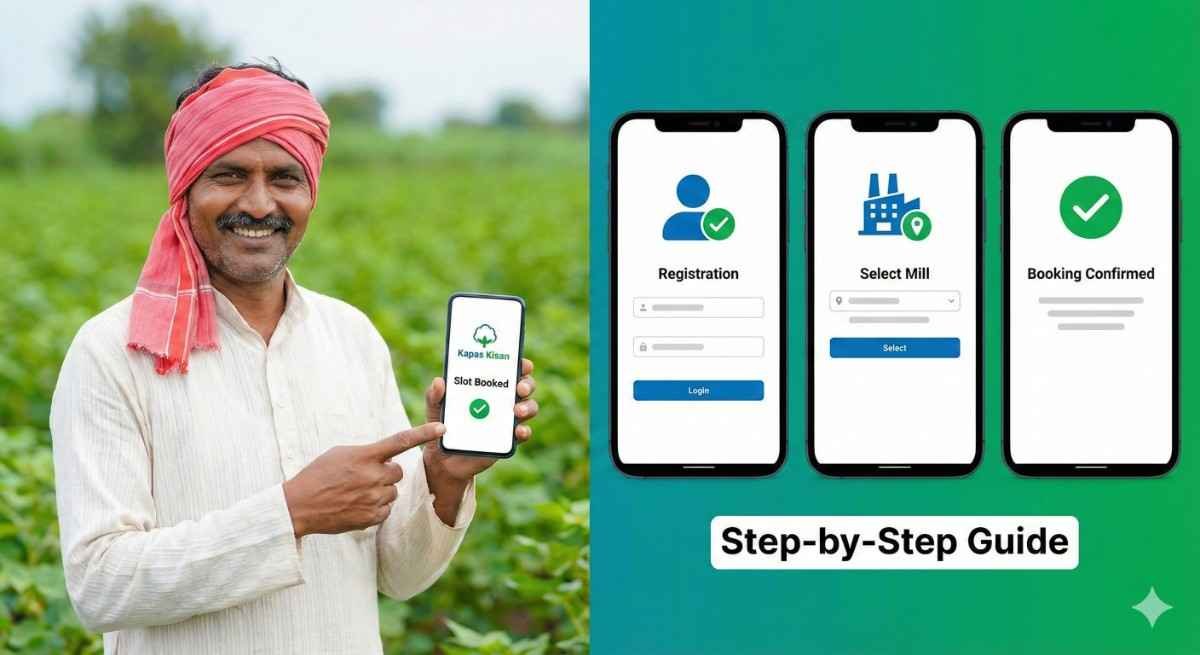
Kapas Kisan App-How to Fix “Farmer Not Registered” & Book Your Slot
Introduction
Kapas Kisan App-How to Fix “Farmer Not Registered” & Book Your Slot. Are you a cotton farmer looking to sell your produce at the Minimum Support Price (MSP)? If you want fair rates and a transparent process, registering with the Cotton Corporation of India (CCI) is your best option.
In the past, selling cotton (Kapas) meant standing in long queues at mandis, unsure of when your turn would come. Today, the Kapas Kisan mobile app (and the associated Cott-Ally ecosystem) has revolutionized this. Now, you can book your slot, select your procurement center (mill), and fix your quantity from the comfort of your home.
In this comprehensive guide, we will walk you through how to register on the Kapas Kisan app, how to book your slot, and most importantly, how to fix the common “Farmer Not Registered” error that many of you are facing.
What is the Kapas Kisan App?
The Kapas Kisan app is a digital initiative by the Cotton Corporation of India (CCI). It bridges the gap between cotton farmers and the government procurement system.
- Primary Goal: To allow farmers to sell cotton at MSP without middlemen.
- Key Features: Slot booking, payment tracking, live MSP rates, and finding nearby procurement centers.
Prerequisites: Before You Start
Before downloading the app, ensure you have the following ready to avoid errors:
- Aadhaar-linked Mobile Number: The number you use must be the same one linked to your land records.
- Land Records: Your details must be updated in your State Agriculture Department’s database (e.g., e-Samridhi in MP, AgriStack, or local Patwari records).
- Bank Passbook: For verifying payment details.
Step 1: How to Register on Kapas Kisan App
Follow these steps to create your profile.
1. Download the App
- Go to the Google Play Store.
- Search for “Kapas Kisan” (Look for the app by The Cotton Corporation of India Ltd).
- Tap Install.
2. Login / Sign Up
- Open the app.
- Select your Language (Hindi/English/Regional).
- Enter your Mobile Number.
- Click on “Get OTP”.
- Enter the 4-digit OTP received on your phone.
3. Profile Creation
- Once logged in, the app will attempt to fetch your details from the State Database based on your mobile number.
- If found, your Name, Father’s Name, and Land Details will auto-populate.
- Verify the details and click “Register”.
Troubleshooting: “Mobile Number Not Registered” Error
“Why does it say ‘Farmer Not Registered’ even after I enter the OTP?”
This is the most common problem farmers face.
The Reason:
The Kapas Kisan app does not store its own independent list of farmers. It validates your mobile number against your State Government’s Agriculture Census/Database. If your number is not linked to your land in the State’s record, CCI cannot verify you.
The Solution:
- Do not panic. The app is working fine; the issue is with the backend data sync.
- Contact your Local Patwari or Agriculture Officer (ADO).
- Ask them to check if your mobile number is updated in the State Farmer Registry (Kisan Panjiyan).
- Once they update it in the state portal, wait 24-48 hours and try logging into the Kapas Kisan app again.
Step 2: How to Change Profile Details
- Bank Details/Land Area: You usually cannot change these directly inside the Kapas Kisan app because they are fetched from the government database to prevent fraud.
- To Change Data: You must visit your local Agriculture Department office to update your land or bank details in the core registry. Once updated there, the changes will reflect in the app upon your next login.
Step 3: How to Select Mill (Procurement Center) & Fix Quantity
Once you are logged in, you need to “Book a Slot” to sell your cotton.
1. Go to “Book Slot”
- On the home dashboard, click on the “Slot Booking” or “Purchase Intent” button.
2. Select Center (Mill)
- The app will show a dropdown list of CCI Procurement Centers in your district.
- Note: These Centers are often Ginning Mills authorized by CCI.
- Select the mill closest to you.
3. Choose Date
- A calendar will appear. Dates appearing in Green are available. Dates in Red are full.
- Select your preferred date.
4. Fix Quantity (Kapus Qty)
- Enter the quantity of cotton you want to sell (in Quintals).
- Warning: Do not enter more than your eligible limit (based on your land holding). If you enter too much, the system will reject it.
5. Confirm Booking
- Review the details.
- Click “Submit” or “Book Now”.
- You will receive a Booking ID and SMS confirmation.
Step 4: How to Cancel a Booking
Plans changed? You must cancel your slot so another farmer can use it.
- Open the App and go to “My Bookings” or “History”.
- You will see your active slot (Date and Mill Name).
- Click the “Cancel” button next to the booking.
- Confirm the cancellation.
- You can now book a new slot for a different date.
Frequently Asked Questions (FAQs)
Q1: Is there a fee to book a slot?
A: No, registration and booking on the Kapas Kisan app are 100% free.
Q2: Can I sell cotton without booking?
A: Generally, no. CCI prioritizes farmers with booked slots to manage the crowd at the mill. Walk-ins may be turned away or made to wait for hours.
Q3: How do I check my payment status?
A: There is a “Payment Status” tab in the app. Enter your Booking ID or Mobile number to see if your payment has been processed. CCI payments usually go directly to your Aadhaar-linked bank account (DBT).
Q4: The app is running very slow. What should I do?
A: This often happens during peak booking hours (morning). Try clearing the app cache (Settings > Apps > Kapas Kisan > Clear Cache) or try booking late in the evening.
Q5: Can I register with a different mobile number than my Aadhaar?
A: No. For MSP payments, the mobile number, Aadhaar, and Bank Account must all be linked.
Conclusion
The Kapas Kisan (cci official app) system is a powerful tool to ensure you get the right price for your hard work. While the technology can sometimes be frustrating—especially the “Farmer Not Registered” error—understanding that this is a link between State and Central records helps you solve it faster.
Next Step for You:
If you are facing the “Not Registered” error, stop trying to reinstall the app. Instead, visit your local Agriculture Supervisor tomorrow morning with your Aadhaar card and Land Papers to update your mobile number in the state registry. This is the only permanent fix!
Read More
- How to Book Urea & Fertilizers in the Framework for Fertilizer Sale (FFS) App: Step-by-Step Guide
- Framework for Fertilizer Sale (FFS): Telangana’s New Centralized Fertilizer App
- Fertilizer Booking App: Mistakenly Entered Less Crop Area? Here’s What Farmers Need to Know
- Monsoon 2026: Best Crops for Farmers as IMD Predicts Weak Rainfall
- Digital India: Identify Your Land Survey Number Instantly Using Your Smartphone





Comments are closed.