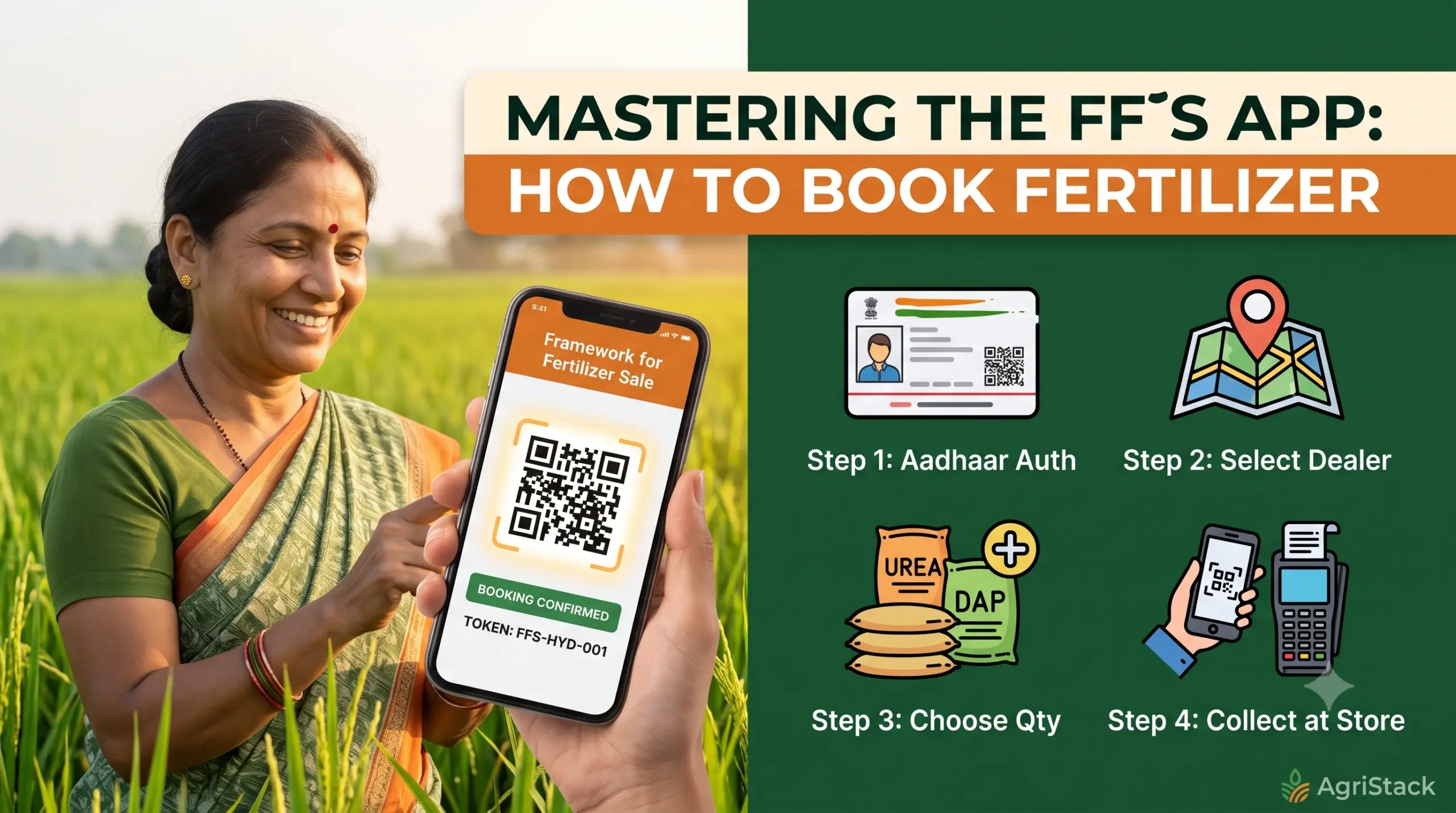
How to Book Urea & Fertilizers in the Framework for Fertilizer Sale (FFS) App: Step-by-Step Guide
How to Book Urea & Fertilizers in the Framework for Fertilizer Sale (FFS) App.The agriculture sector in India is rapidly adopting digital technology to bring transparency, efficiency, and ease to daily farming operations. One of the most significant changes for farmers across regions—including Telangana’s ongoing shift under the national AgriStack initiative—is the transition to the Framework for Fertilizer Sale (FFS) app (com.agristack.fsas).
Replacing older state-level booking portals, this central mobile framework allows farmers to pre-book subsidized fertilizers like Urea, DAP (Di-Ammonium Phosphate), MOP (Muriate of Potash), and NPK complexes directly from their smartphones.
If you are wondering how to book Urea or other fertilizers in the Framework for Fertilizer Sale app, this comprehensive, step-by-step guide walks you through everything from account registration to presenting your token at your local fertilizer dealer.
What is the Framework for Fertilizer Sale (FFS) App?
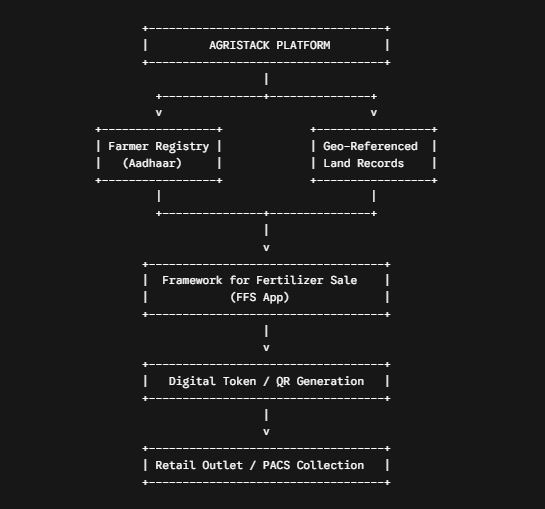
The Framework for Fertilizer Sale (FFS) is an official Android application developed under the Ministry of Agriculture & Farmers Welfare, Government of India. Operating within the broader AgriStack ecosystem, the FFS app links your farm’s land records, crop surveys, and identity (via Aadhaar / Farmer ID) into a single unified platform.
Key Advantages of Using the Central FFS App:
- Fair Allocation: Quotas are calculated dynamically based on your registered land area and sown crop requirements.
- Elimination of Long Queues: Pre-booking reserves your stock before you travel to the store or Primary Agricultural Credit Society (PACS).
- Prevention of Black Marketing: Tokenized QR codes ensure that subsidized fertilizers are supplied directly to verified farmers.
- Real-time Inventory Tracking: View available fertilizer stock across nearby authorized dealers before making a booking.
Prerequisites Before Booking Fertilizer
Before starting the booking process, ensure you have the following ready:
- An Android Smartphone with a stable internet connection.
- Aadhaar Card Number (linked with your primary mobile number for OTP verification).
- AgriStack Farmer ID / Land Record Details (Survey / Khata Number or Pahani details).
- The official Framework for Fertilizer Sale app installed on your phone.
Step 1: Downloading & Registering on the FFS App
If you haven’t installed or set up your account on the FFS application yet, follow these initial setup steps:
- Download the App: Open the Google Play Store, search for Framework for Fertilizer Sale (Package:
com.agristack.fsas), and tap Install. - Select Language: Launch the app and select your preferred language (Telugu, English, or Hindi).
- Mobile Verification: Enter your 10-digit mobile number linked with your Aadhaar/Farmer ID. Tap Get OTP and enter the 6-digit code received via SMS.
- Identity Verification: Enter your Aadhaar Number or AgriStack Farmer ID. The app will fetch your verified profile details, including your state, district, mandal, and village.
- Set Primary Dealer: Select your nearest primary fertilizer retail outlet or local PACS center as your default supplier.
Step 2: Checking Your Fertilizer Entitlement & Quota
Once logged in, the app automatically determines your subsidized quota to ensure fair distribution:
- Go to the Dashboard or Home Screen of the FFS app.
- Tap on “Check Entitlement” or “My Quota”.
- Select your active Cropping Season (e.g., Kharif or Rabi) and your cultivated crop type.
- The system will display the maximum number of bags allocated to you for Urea, DAP, MOP, and NPK, calculated based on your verified land acreage in the central database.
Step 3: Complete Step-by-Step Fertilizer Booking Process
Follow these precise steps to reserve your fertilizer stock online:
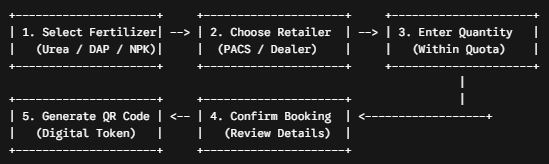
1. Initiate a New Booking
- From the main dashboard, tap the “Book Fertilizer” button.
2. Choose the Fertilizer Type
- Select the specific fertilizer you need (e.g., Urea, DAP, or NPK).
- View the current government-subsidized price per bag listed on screen.
3. Select Retail Outlet / Stock Location
- The app will display your primary selected dealer along with real-time stock levels.
- If your primary dealer is out of stock, select an alternative authorized dealer or local PACS center in your mandal from the interactive list.
4. Enter Bag Quantity
- Input the number of bags you wish to purchase.
- Note: You cannot exceed your remaining seasonal quota limit displayed on the screen.
5. Confirm and Generate Token
- Review the summary of your booking (Fertilizer Type, Quantity, Retail Store Name, Total Price).
- Click “Confirm Booking”.
- The app will process your request and generate a unique Digital QR Code Token saved under your profile. You will also receive a confirmation SMS.
Step 4: Collecting Your Fertilizer at the Retail Outlet
After successfully generating your digital booking token, complete your purchase by following these steps:
- Visit the Selected Outlet: Go to the chosen retail store or PACS during its working hours within the token validity period (typically 48–72 hours).
- Present the QR Token: Open the FFS app, go to “My Bookings”, and show the QR Code Token to the dealer on your screen.
- Dealer PoS Verification: The dealer scans your QR code using their Point of Sale (PoS) device or dealer app interface to verify your booking against central records.
- Make Payment & Receive Goods: Pay the government-mandated subsidized rate (via UPI, cash, or card), take your receipt, and collect your fertilizer bags.
Download Framework for Fertilizer Sale (FFS) App Here
Download FFS AppFrequently Asked Questions (FAQs)
1. What should I do if my primary store is out of Urea or DAP?
If your preferred retail store shows zero stock, the FFS app allows you to select any nearby authorized dealer or PACS center within your mandal that has active inventory available.
2. Can I collect fertilizer without an internet connection at the store?
Yes. Once your QR code token is generated, it remains stored under the “My Bookings” section in your app and can be displayed offline to the dealer for scanning.
3. What if I do not own a smartphone?
Farmers without smartphones can visit their local Rythu Seva Kendra (RSK), PACS office, or village agriculture officer, who can assist in generating a booking token through the central web portal.
Summary Checklist for Farmers
| Action | Status / Requirement |
| Download App | com.agristack.fsas from Google Play Store |
| Authentication | Mobile Number + Aadhaar OTP |
| Prerequisites | Linked AgriStack Farmer ID & Land Records |
| Booking Steps | Select Crop $\rightarrow$ Choose Fertilizer $\rightarrow$ Select Dealer $\rightarrow$ Generate QR Token |
| Collection | Present QR Code Token at Retailer PoS Terminal |
- How to Book Urea & Fertilizers in the Framework for Fertilizer Sale (FFS) App: Step-by-Step Guide
- Framework for Fertilizer Sale (FFS): Telangana’s New Centralized Fertilizer App
- Fertilizer Booking App: Mistakenly Entered Less Crop Area? Here’s What Farmers Need to Know
- Monsoon 2026: Best Crops for Farmers as IMD Predicts Weak Rainfall
- Digital India: Identify Your Land Survey Number Instantly Using Your Smartphone