Framework for Fertilizer Sale (FFS)
Framework for Fertilizer Sale (FFS).The agricultural landscape in Telangana is undergoing a digital overhaul. In a decisive move toward transparency, equitable distribution, and digitized farm operations, the Government of Telangana is transitioning from state-level fertilizer booking systems to the Framework for Fertilizer Sale (FFS) app.
Developed by the Ministry of Agriculture & Farmers Welfare, Government of India under the national AgriStack digital ecosystem, the FFS app replaces previous state booking tools. It provides a unified platform for farmers across Telangana to pre-book essential fertilizers such as Urea, DAP (Di-Ammonium Phosphate), MOP (Muriate of Potash), and NPK complexes.
This guide details what the central FFS app is, why Telangana is implementing it, how to complete your registration, step-by-step fertilizer booking procedures, and the verification process at retail fertilizer outlets.
What is the Framework for Fertilizer Sale (FFS) App?
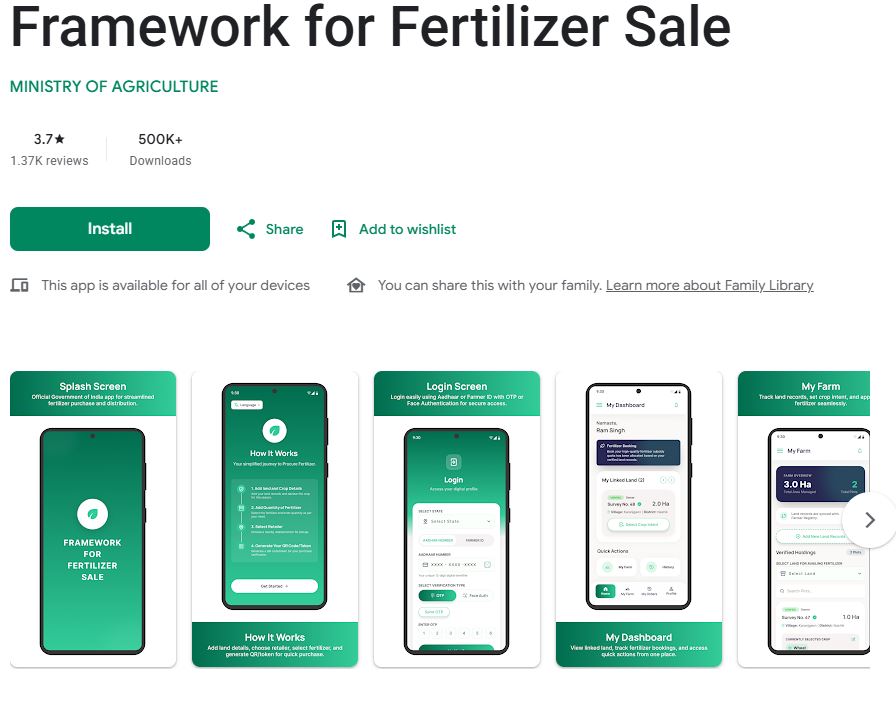
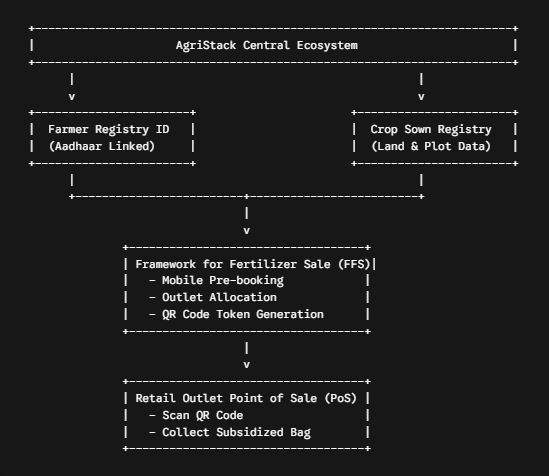
The Framework for Fertilizer Sale (FFS) is an Android application (com.agristack.fsas) designed to digitize subsidized fertilizer allocation and sales. Built on top of the central government’s AgriStack framework, FFS links fertilizer allocations directly to validated farmer identities (Farmer ID / Aadhaar) and land holding records.
Key Differences: Old App vs. Central FFS App
| Feature | Legacy Telangana Fertilizer App | Central FFS App (com.agristack.fsas) |
| System Scope | State-managed isolated database | Centralized AgriStack integration across India |
| Land Record Linkage | Manual data entry / Local survey | Auto-verified through AgriStack Farmer Registry & Land Records |
| Outlet Allocation | General queueing / Direct dealer visits | Advance preferred outlet selection with real-time stock allocation |
| Collection Method | Manual verification / Basic app booking | Unique QR Code Token scanning at dealer outlets |
| Transparency | Susceptible to local hoarding & diversion | Black-market reduction via end-to-end QR code transaction tracking |
Why Telangana is Implementing the Central FFS App
During peak cropping seasons (Kharif and Rabi), demand for essential inputs like Urea and DAP surges across districts like Nalgonda, Khammam, Karimnagar, and Nizamabad. In the past, uneven distribution led to long dealer queues, artificial shortages, and fertilizer diversion.
The transition to the central Framework for Fertilizer Sale (FFS) addresses these challenges through three core functions:
- Demand Estimation Based on Land Records: By syncing with AgriStack registries, the system calculates exact fertilizer quotas according to land acreage and crop type.
- Preventing Black Marketing & Over-Purchasing: Quota-based pre-booking ensures every genuine farmer receives their allocation without hoarders buying in bulk.
- Guaranteed Outlet Stocking:Selecting your preferred retail outlet before booking gives dealers clear advance demand visibility, reducing out-of-stock scenarios.
How to Register on the Framework for Fertilizer Sale (FFS) App
Follow this step-by-step walkthrough to download, register, and set up your profile on the central FFS app.
1.Download and Install the Official App:Android 6.0 or higher required.
Open the Google Play Store on your Android smartphone, search for Framework for Fertilizer Sale (Package name: com.agristack.fsas), and tap Install. Ensure you download the official app released by the Ministry of Agriculture & Farmers Welfare.
2.Initialize Mobile Authentication:Use Aadhaar-linked mobile number.
Launch the app and select your language preference (Telugu or English). Enter your 10-digit mobile number linked to your Aadhaar / Farmer ID and tap Get OTP. Enter the 6-digit OTP received via SMS to verify your mobile identity.
3.Link Farmer ID & Complete Profile Verification:AgriStack Integration.
Enter your 12-digit Aadhaar Number or unique AgriStack Farmer ID. The application will fetch your registered demographic details and linked farmland plot details from the central government database. Verify your name, district, mandal, and village details on screen.
4.Select Primary Preferred Retail Outlet:Geolocated Dealer Search.
Select your default primary fertilizer dealer or PACS (Primary Agricultural Credit Society) center from the dropdown menu. Selecting your local dealer ensures your fertilizer allocations are routed to an accessible store nearby.
How the Fertilizer Booking Process Works (Step-by-Step)
Once registered, pre-booking Urea, DAP, NPK, or MOP takes only a few minutes on your smartphone.
Step 1: Select Crop & View Entitlement Quota
Log into the FFS app during the booking window. The app displays your eligible quota of fertilizers calculated based on your linked farmland acreage. Select the crop season (e.g., Kharif/Rabi) and the specific fertilizer type required (Urea, DAP, NPK, MOP).
Step 2: Choose Retail Outlet & Quantity
Choose the quantity of bags required within your authorized ceiling limit. Confirm your preferred retail outlet or select an alternative nearby dealer if your primary store lacks stock.
Step 3: Submit Application & Generate Unique QR Code
Review your request and submit. Upon automated approval, the system generates a unique QR Code Token stored directly under the ‘My Bookings’ section of the app.This digital QR token contains encoded transaction details, including farmer identity, dealer ID, and approved bag quantities.
Retail Outlet Collection Process
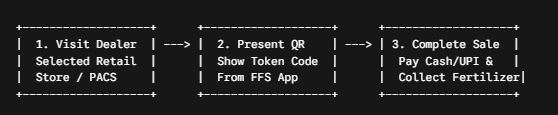
Visit Selected Dealer: Head to the retail fertilizer outlet chosen during your mobile booking.
- Present Digital QR Code: Open the FFS app, navigate to My Bookings, and show the QR code token to the dealer.
- Scan at PoS Terminal: The dealer scans your QR code using their Point of Sale (PoS) device or dealer app interface.
- Payment & Stock Collection: Pay the government-subsidized rate via cash, UPI, or card, and collect your fertilizer bags. The app automatically updates your remaining quota in real time.
Key Features & Benefits of the Central FFS App
- Zero Queue Waiting Time: Pre-booking ensures your allocation is reserved at your chosen dealer, preventing unnecessary store waiting times.
- Transparent Quotas: Eliminates confusion regarding stock availability by displaying real-time allocation status.
- Offline Token Accessibility: Once generated, your QR code token can be saved or screenshotted for presentation even in low-connectivity areas.
- Central Integration:Part of the broader AgriStack initiative, ensuring seamless cross-verification with crop survey databases and state government welfare delivery.
Frequently Asked Questions (FAQs)
1. What is the official app package for the central fertilizer system?
The official application is titled Framework for Fertilizer Sale (com.agristack.fsas), available for download on the Google Play Store.
2. Is the old Telangana Fertilizer app still operational?
The Government of Telangana is transitioning from the legacy state-specific application (com.org.agri.urea) to the centralized Framework for Fertilizer Sale (FFS) platform under the AgriStack initiative.
3. What documents are required for registration?
You need an active mobile number, an Aadhaar card / AgriStack Farmer ID, and registered farmland land details (Pahani/RoFR) linked to your identity.
4. Can a farmer collect fertilizer without an Android smartphone?
While the app enables direct self-booking, local agriculture department representatives, Rythu Seva Kendras, and PACS dealers can assist farmers who do not own smartphones by accessing the central portal on their behalf.
- How to Book Urea & Fertilizers in the Framework for Fertilizer Sale (FFS) App: Step-by-Step Guide
- Framework for Fertilizer Sale (FFS): Telangana’s New Centralized Fertilizer App
- Fertilizer Booking App: Mistakenly Entered Less Crop Area? Here’s What Farmers Need to Know
- Monsoon 2026: Best Crops for Farmers as IMD Predicts Weak Rainfall
- Digital India: Identify Your Land Survey Number Instantly Using Your Smartphone