

Urea Booking App- (Fertilizer Booking App) How to Book Urea in Telangana
Urea Booking App- (Fertilizer Booking App).Quick Start Guide: Booking Urea via the Telangana Fertilizer(Urea) App
Follow these 5 easy steps to secure your urea stock from home.
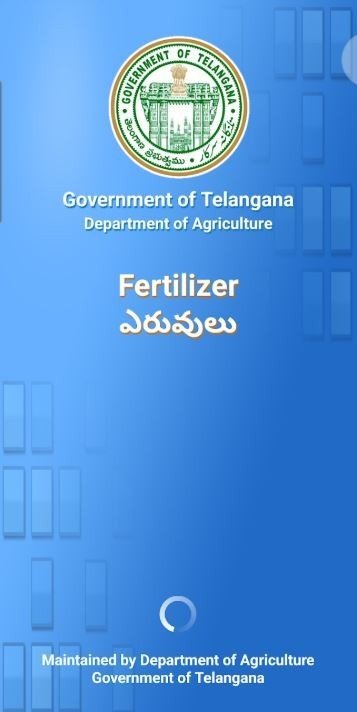
Step 1: Download & Registration
- Download: Install the Telangana Fertilizer App from the Google Play Store.
- Log In: Open the app and enter your Mobile Number.
- OTP Verification: You will receive a 4-digit One-Time Password (OTP) on your phone. Enter it to verify your account.
- Note: Use the mobile number linked to your Pattadar Passbook for automatic data syncing.
Step 2: Link Your Identity
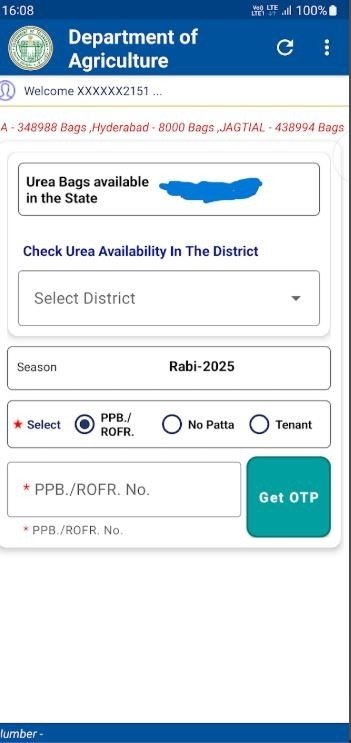
- Enter Details: Enter your Aadhaar Number and your Pattadar Passbook (PPB) Number.
- Automatic Sync: The app will automatically pull your land records, including the total acreage and the crops you have registered for the current season (Vanakalam/Yasangi).
- Tenant Farmers: If you are a tenant, enter your Aadhaar and the landowner’s PPB number. The landowner will receive an OTP for consent to validate your booking.
Step 3: Select Crop and Quantity
- Select Crop: Choose the crop you are currently growing (e.g., Paddy, Cotton, Maize, Chilli).
- Check Requirement: Based on your land size and crop type, the app will display the eligible number of urea bags.
- Small Farmers: Full quota available in one go.
- Large Farmers: Quota released in 2–3 phases over 30 days.
Step 4: Choose Your Dealer & Book
- Check Stock: View the Live Stock Status of dealers in your Mandal or Village.
- Select Dealer: Choose a convenient Government (PACS) or Private dealer that has stock available.
- Confirm Booking: Click on “Book Now.” You will receive a unique Booking ID via SMS.
Step 5: Collection
- 24-Hour Window: Visit the selected dealer within 24 hours of booking.
- Verification: Show your Booking ID and your Aadhaar/Passbook to the dealer.
- Payment: Pay the fixed government price and collect your bags.
- Tip: If you don’t collect within 24 hours, the booking expires and the stock is returned to the general pool.
Pro-Tips for Success:
WhatsApp Updates: Join the official Telangana Agriculture WhatsApp Channel for alerts on new stock arrivals and lorry movements.
Accuracy Matters: Ensure the crop details match what is in the ground. Mismatched data may block future subsidies.
Need Help? Visit your local Agricultural Extension Officer (AEO) or the nearest Women Self-Help Group (SHG) center for hands-on assistance with the app.
Download Urea booking (Fertilizer booking app)-Official App by Govt of Telangana.
Fertilizer booking app DownloadFrequently Asked Questions (FAQs): Telangana Digital Urea Booking app
Here are the answers to the most common questions regarding the fertilizer booking app by govt of telangana.
1.Is the app available for all types of fertilizers?
No. Currently, the digital booking system is specifically for Urea. Distribution for DAP (Di-Ammonium Phosphate) and other complex fertilizers will continue through the existing manual/POS systems at retail outlets for now.
2. Why can’t I book my full urea requirement at once?
To ensure that all farmers get a fair share and to prevent hoarding:
Small farmers can book their entire requirement in one phase.
Large farmers will have their quota released in 2 to 3 phases within a one-month period. Check the app regularly to see when your next phase is unlocked.
3. What happens if I don’t collect the urea within 24 hours?
The system is designed for high turnover. If you do not visit the dealer and provide your Booking ID within 24 hours, your digital reservation will automatically expire. The stock will then be made available for other farmers to book.
4. I am a tenant farmer. How can I use the app?
Tenant farmers are fully eligible! You will need to enter the Pattadar Passbook number of the land you are cultivating. The system will send an OTP (One-Time Password) to the registered mobile number of the landowner. Once they provide the OTP to you and you enter it into the app, your booking is authorized.
5. The app says my crop details are incorrect. What should I do?
The app is linked to the e-pass mechanism and land records. If the crop shown doesn’t match what you have sown (e.g., it shows Paddy but you sowed Chilli), contact your local Agricultural Extension Officer (AEO) immediately to update your crop registration data.
6. Can I book urea from a dealer in a different Mandal?
The app is location-aware. While it primarily shows dealers in your registered Mandal and Village to ensure local supply, you can view stock levels across the district. However, it is recommended to book at your nearest center for easier verification.
7. What if I don’t have a smartphone?
Don’t worry! The Government has authorized Women Self-Help Groups (SHGs), local dealers, and Agriculture Department officials to assist farmers. You can visit these centers with your Passbook and Aadhaar, and they will help you complete the digital booking.
8. How do I know when fresh stock (lorry arrivals) reaches my village?
The app features a Live Stock Status and tracking for lorry arrivals. Additionally, you can join the official Telangana Agriculture WhatsApp Channel for real-time notifications sent directly to your phone.
Read More
- IoT in agriculture-How IoT & Drones Cut Farm Water & Fertilizer Waste by 30%
- Indian Maize Market Price Forecast 2026–27: Fundamental Analysis, Technical Trends, El Niño Impact and Six-Month Price Outlook
- How to Book Urea & Fertilizers in the Framework for Fertilizer Sale (FFS) App: Step-by-Step Guide
- Framework for Fertilizer Sale (FFS): Telangana’s New Centralized Fertilizer App
- Fertilizer Booking App: Mistakenly Entered Less Crop Area? Here’s What Farmers Need to Know







1 thought on “Urea Booking App- (Fertilizer Booking App) How to Book Urea in Telangana”
Comments are closed.