Fertilizer Booking App Guide: How to Book Urea Online
Fertilizer Booking App.The life of a farmer is a race against time and nature. In Telangana, one of the biggest hurdles during the Kharif and Rabi seasons has historically been the scramble for fertilizers. We’ve all seen the long queues, the chaotic dealer shops, and the uncertainty of whether stock will be available when the crops need it most.
To solve these systemic issues, the Telangana government has launched the Fertilizer Booking App. This digital initiative is a game-changer for transparency, ensuring that every farmer—including tenant farmers—gets their fair share of Urea without the stress of the “first-come, first-served” chaos.
In this guide, we will walk you through everything you need to know about the Fertilizer Booking App, from installation to picking up your bags at the dealer.
Why the Fertilizer Booking App is a Game-Changer
Before we dive into the “how-to,” it’s important to understand why this app is necessary. The primary goal of the Fertilizer Booking App is to digitize the distribution of Urea.
- Transparency: No more hidden stocks. You can see exactly how much Urea is available in your Mandal.
- Fair Allocation: Urea is distributed based on actual crop type and land extent.
- Tenant Farmer Support: A dedicated system allows tenant farmers to secure fertilizers using the land owner’s passbook details.
- Time-Saving: Booking from home means you only go to the dealer when your stock is ready.
Step-by-Step Guide: How to Use the Fertilizer Booking App
The pilot launch for this system begins on December 20, 2025. Follow these steps to ensure your booking is successful.
1. Downloading and Installing the App
The official app is developed by the Department of Agriculture and hosted on the Google Play Store.
- Search for: “Fertilizer Booking App” or use the direct link: https://play.google.com/store/apps/details?id=com.org.nic.agri.urea
- https://play.google.com/store/apps/details?id=com.org.agri.urea&pcampaignid=web_share
- Note: While the name suggests all fertilizers, currently, the system is exclusively for Urea booking.
Download fertilizer booking APK file if playstore app doesnt work in your mobile
Fertilizer Booking Apk Download2. The Registration & Login Process
Once the app is installed, follow these steps:
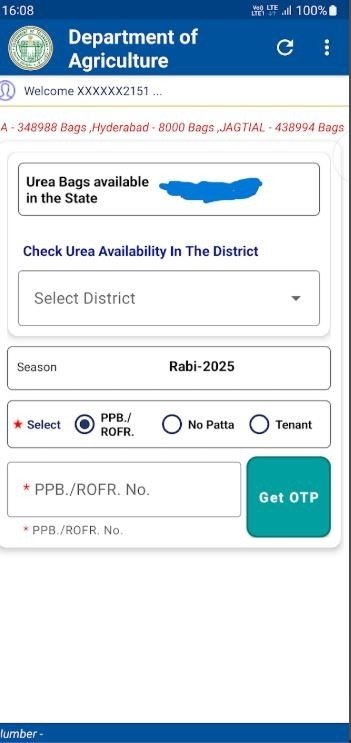
- Mobile Login: Enter your active mobile number and verify it using the OTP sent to your phone.
- Pattadar Passbook Linkage: Enter your Pattadar Passbook Number. The app will automatically fetch your land details from the government database.
- Data Entry: You will need to manually enter the Crop Type (e.g., Paddy, Maize, Cotton) and the Cultivation Area (in acres).
- Automatic Calculation: Based on your inputs, the app will calculate exactly how many bags you are eligible for.
3. Special Instructions for Tenant Farmers
The Telangana government has made special provisions to ensure tenant farmers aren’t left behind:
- Log in with your own mobile number.
- Enter the Pattadar Passbook number of the land you are leasing.
- Crucial Step: An OTP will be sent to the Land Owner’s registered mobile number. You must coordinate with the owner to receive this OTP for approval.
- Once verified, the tenant farmer can proceed with the booking in their name.
Understanding the “Spells” System for Urea Allocation
To prevent hoarding and ensure a steady supply throughout the growing season, the government has introduced a Spells System. This system dictates how many times you can book urea based on your land size.
| Land Extent | Number of Spells (Installments) |
| 0 – 1 Acre | 1 Spell |
| 1 – 5 Acres | 2 Spells |
| 5 – 20 Acres | 3 Spells |
| Above 20 Acres | 4 Spells |
Important: There is a mandatory 15-day gap between each spell. This ensures that the fertilizer is used at different stages of crop growth rather than being collected all at once.
How to Book and Collect Your Urea
Once your profile is set up, booking is a simple four-step process:
- Check Stock: Select your District, Mandal, and Village to see real-time stock levels at nearby dealer shops.
- Confirm Booking: Select the number of bags you need (within your eligibility limit) and choose your preferred dealer.
- Generate Booking ID: After confirming, a unique Booking ID will be generated.
- Pickup: Visit the dealer shop within 24 hours. If you fail to collect the stock within this timeframe, the booking will expire, and the stock will be returned to the general pool.
Troubleshooting: What if my phone number is different?
The app pulls mobile numbers linked to the Rythu Bharosa scheme. If you have changed your phone number and cannot receive the OTP, you must contact your Agriculture Extension Officer (AEO) immediately to update your records in the central database.
FAQs: Frequently Asked Questions
Q1: Can I book DAP or Complex fertilizers through this app?

No. Currently, the app is only for Urea. Other fertilizers must be purchased through the traditional manual system at the dealer shop.
Q2: What if I don’t own a smartphone?
You can use a neighbor’s or a family member’s smartphone. The login is tied to your passbook and OTP, not the specific physical device.
Q3: How long is the Booking ID valid?
The ID is valid for 24 hours. We recommend booking only when you are ready to travel to the dealer shop.
Q4: Can I choose a dealer in a different Mandal?
Generally, you should select a dealer within your district or Mandal for easier verification and logistics.
Q5: Is there any extra fee for using the app?
No, the app is free to use. You only pay the government-regulated price for the Urea at the dealer shop.
Conclusion
The Fertilizer Booking App of Telangana State is a significant step toward “Digital Agriculture.” By following this guide, you can ensure your crops get the nutrients they need without the traditional headache of fertilizer shortages.
Remember, the pilot starts on December 20, 2025. Download the app today and get your details updated to stay ahead of the next farming season!
Read More about Fertilizer booking
Also Read
- Digital India: Identify Your Land Survey Number Instantly Using Your Smartphone
- AI in Farming: How Indian Farmers Are Transforming Agriculture
- Best Winter Crops for Export From India
- Dhaincha Farming Guide: Save 50% on Urea & Improve Soil Health
- Fertilizer Booking App Guide: How to Book Urea Online
- 67 Google Easter Egg: Why is it Trending?
- The Assassination of Sharif Osman Hadi
- Kapas Kisan Slot Booking Process
- Understanding the basics of bond investing for income
- Urea Booking App- (Fertilizer Booking App) How to Book Urea in Telangana


3 thoughts on “Fertilizer Booking App Guide: How to Book Urea Online”
Comments are closed.